

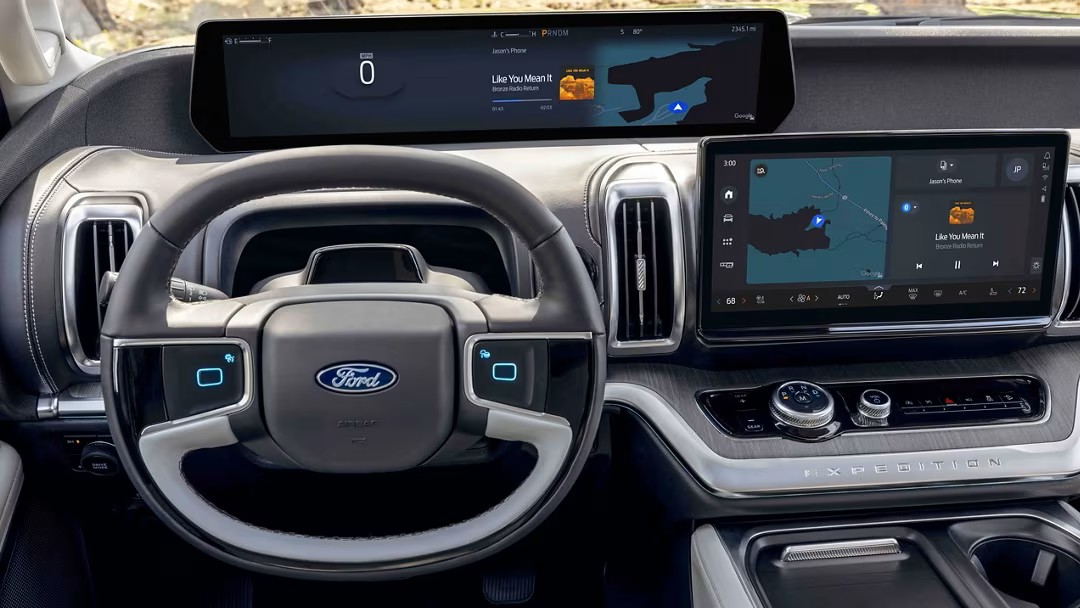
Today’s Ford vehicles are packed with smart technology that makes driving easier, safer, and more connected than ever. From hands-free driving to app-based controls, Ford’s latest innovations are designed to fit seamlessly into your lifestyle, whether you’re commuting, working on the go, or planning a weekend escape.
In this guide, we’ve pulled together the top Ford technology tips and videos to help you unlock every feature your vehicle offers.
1. Ford Digital Experience: Your Tech Hub
The Ford Digital Experience ties everything together, giving you access to personalization, entertainment, and productivity right from your dashboard. With apps for work and play, curated content on the heads-up display, and seamless integration with the FordPass app, this video gives you a complete overview.
2. Creating Your Full Ford Profile
Your Ford profile keeps your vehicle personalized to you, saving seat positions, navigation preferences, climate control settings, and more. This video shows how to create and customize your full driver profile for maximum convenience.
3. Managing Life on the Go with the FordPass App
With the FordPass app, you can control your vehicle from your phone: lock/unlock doors, start the engine, check fuel or charge status, and even find your parked car. It also helps you schedule service and connect with your dealership.
4. Heads-Up Display: Keep Your Eyes on the Road
The available Heads-Up Display projects key driving information—like speed, navigation, and driver-assist alerts—directly onto your windshield. No more glancing down at your dashboard. This video shows how it works and why it improves both safety and convenience.
5. BlueCruise 1.5: Hands-Free Driving & Automatic Lane Change
Ford’s latest BlueCruise 1.5 technology takes hands-free driving to the next level. It allows you to relax during highway commutes with lane-centering and adaptive cruise control. With automatic lane change, the system responds when you signal—making long drives easier than ever.
More Ford Digital Experience Features You’ll Love
Ford’s digital system is more than just a screen, it’s a fully connected driving companion. These short videos highlight some of the most practical tools you’ll use every day.
6. Google Maps Integration
No phone required. With Google Maps built directly into your Ford Digital Experience, you’ll get saved favorites, real-time traffic, and turn-by-turn navigation on a wide display designed to keep your eyes on the road.
7. Seat Controls Made Simple
Enjoy maximum comfort with flexible seat adjustments for both drivers and passengers. Save your preferences to your profile so your perfect setup is ready every time you start the vehicle.
8. Steering Wheel Controls
Touchpads located on both sides of the steering wheel give you quick access to common functions, like audio, calls, and settings, so you stay in control without distractions.
9. Lighting Controls at Your Fingertips
All of your lighting options, from headlights to ambient cabin lighting, are available on your center screen, making it easier than ever to adjust visibility and comfort.
10. Climate Controls
Your entire climate system is conveniently displayed along the bottom of the center screen. Easily adjust temperature, fan speed, and heated or cooled seating with just a touch.
11. Audio Controls
Choose how you want to interact with your sound system: steering wheel buttons, center dial, or voice commands. However you control it, Ford’s audio system is built for clarity and ease.
12. Bring All Your Apps with You
Your Ford can seamlessly embed the apps you use most, whether for music, productivity, or entertainment. With saved preferences and easy downloads, the Ford Digital Experience keeps your world connected wherever you go.
Final Thoughts: Drive Smarter with Ford Tech
Every new Ford comes with tools that make your time behind the wheel more connected, more confident, and more enjoyable. The best way to learn is to explore these features yourself, whether through the FordPass app on your phone or by taking a hands-on test drive here in Albuquerque.
👉 Find Your Ride with the Ford Digital Experience at Power Ford
FAQs About Ford Technology
Can I update my Ford technology over time?
Yes—many Ford vehicles support over-the-air updates, which means new features and improvements can be added without visiting a dealership.
Is BlueCruise available on all Ford models?
Currently, BlueCruise is available on select models like the F-150, Mustang Mach-E, and certain SUVs. Ask Power Ford which trims include it.
Do I need to pay for FordPass?
The FordPass app itself is free, but some connected services may require an active subscription depending on your vehicle and features.
Connect with us

Recent Blog Entries
- Your Guide to Genuine Ford Parts and Trusted Service in Albuquerque
- How to Choose a Ford Truck or SUV for Towing, Off-Road, and Performance in New Mexico
- Ford Financing Options for Bad Credit and Negative Equity Trade-Ins
- Finding a Trusted Ford Blue Advantage Dealer in Albuquerque
- What to Look for in a Ford Dealership Across Albuquerque and Santa Fe